Removing triangles
Use the Remove Triangles tool
To use the tool:
- Select a model and the surfaces you want to work on. A list of the available tri-meshes in the model is displayed. Select the tri-meshes to modify by checking the individual check boxes, or by right-clicking the list and making a selection from the context menu.
-
Check the criteria to use to select which triangles must be removed from the following options:
Delta TVDSS All triangles with a TVDSS difference larger than the specified value will be removed (Delta TVDSS = the maximum height difference between any two nodes of a triangle).
Dip All triangles with a dip property value larger than the specified dip value will be removed.
Smoothness All triangles with a smoothness property value larger than the specified smoothness value will be removed.
Edge length All triangles that contain a triangle edge which is longer than the specified value will be removed.
- Click OK to remove the triangles that meet the selected criteria.
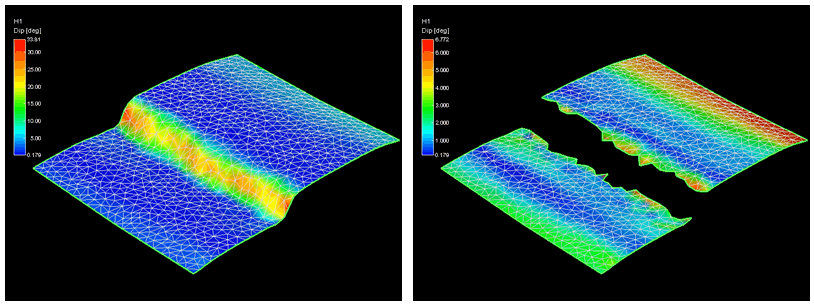
The Remove Triangles tool. All triangles with a dip greater than 7 degrees are removed (the property color scheme automatically updates after removal) click to enlarge